
See otherpeople’s trips.
You might find an idea for your next trip.You can share yours here, too.
Open the mapNo account needed to explore.
Here’s how it works.
From seeing someone’s trip to making your own.
-
See other people’s trips
Open the map and choose “Popular trips” in the sidebar. Pick a country, then open a trip to see its places and daily itinerary.
Start with a country you’d like to visit.
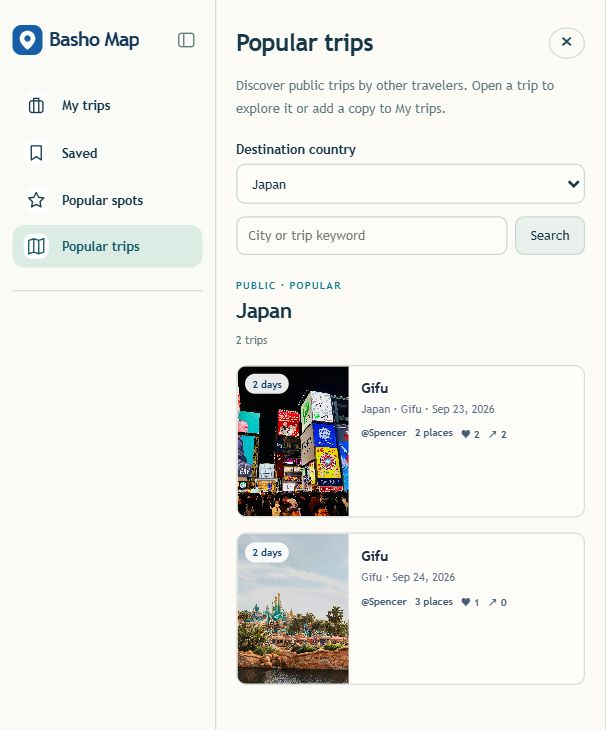
The actual Popular trips screen -
Plan your own trip
Create a new trip from “My trips” in the sidebar. In “Schedule”, add places and transport to each day, then arrange their order and times.
Keep your packing list and to-dos in Checklist, too.
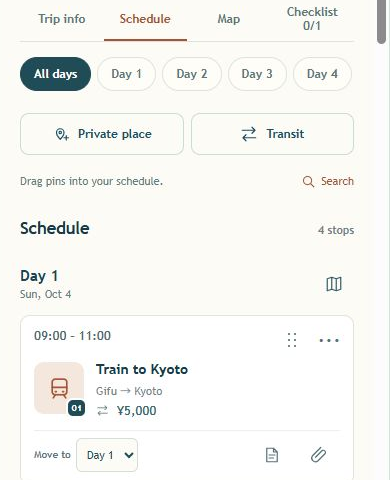
A sample trip in Schedule -
Share your trip, too
Choose “Publish itinerary” in your trip. Review what will be public before publishing. Other travelers can then discover your trip in “Popular trips”.
Sign in to publish. Private places are excluded from the public edition.
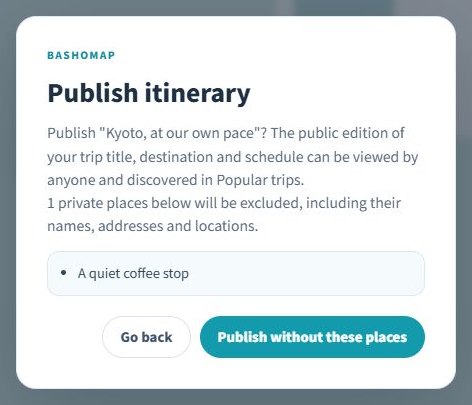
A sample trip’s publication review